
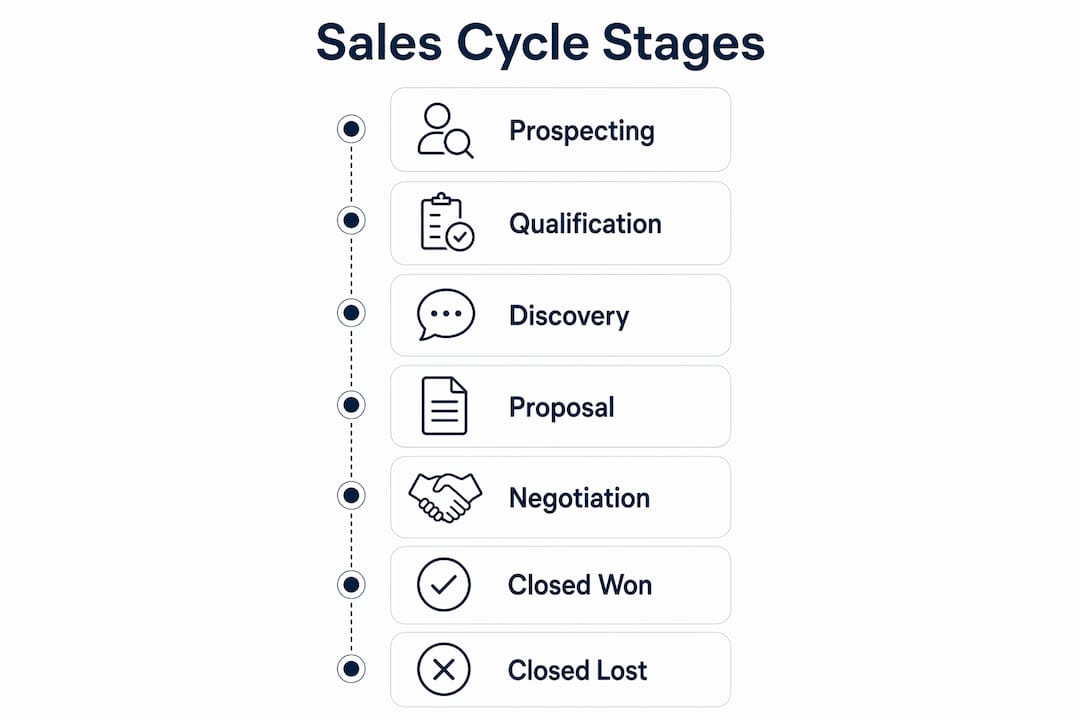
Sales cycle stages in Salesforce are the predefined steps that move an opportunity from initial contact to closed deal, and getting them right is the foundation of every reliable pipeline report and revenue forecast. Most effective pipelines function best with 5 to 7 stages, because excessive stages create confusion and inaccurate reporting. The typical sequence runs through Prospecting, Qualification, Discovery, Proposal, Negotiation, Closed Won, and Closed Lost, with each stage tied to a probability percentage and a forecast category that influence Salesforce’s pipeline calculations.
Here is a quick overview of how those stages break down:
- Prospecting: Early pipeline; potential fit identified but not yet confirmed
- Qualification: Budget, authority, need, and timeline assessed
- Discovery / Needs Analysis: Buyer’s specific challenges and goals uncovered
- Proposal: Pricing and scope presented to the customer
- Negotiation: Contract terms and conditions being finalized
- Closed Won: Deal successfully completed
- Closed Lost: Deal not proceeding; reason captured separately
Each stage links directly to an opportunity’s probability percentage and forecast category in Salesforce, which means the stage you select on a record is not just a label. It feeds weighted pipeline views, Kanban boards, and forecasting automation. Keeping your stage list tight with a moderate number of open stages plus the two closed outcomes preserves the clarity that makes those reports trustworthy.
What are the typical sales cycle stages in Salesforce?
Understanding each stage in sequence helps you design a stage list that reflects genuine buyer progress rather than seller activity. Here is how the core stages work in practice.
1. Prospecting
This is where potential opportunities enter the pipeline. A rep has identified a company or individual that matches the buyer profile, but no meaningful conversation has taken place yet. The primary question at this stage is whether there is a real opportunity worth pursuing. Deals here often carry a low probability, and the close date may be many months away.

2. Qualification
Qualification determines whether the prospect has the budget, authority, need, and timeline to become a customer. Without a clear answer to all four, the deal should not advance. Skipping this stage properly is one of the most common reasons pipelines become bloated with deals that never close.
3. Discovery / Needs analysis
Discovery digs into the buyer’s specific challenges, current processes, and desired outcomes. The aim is to gather enough information to build a proposal that addresses what the customer actually wants, not what you assume they want. A deal should only leave this stage once you have a clear picture of the buyer’s decision criteria and the key stakeholders involved.
4. Proposal
The proposal stage begins when you present pricing, scope, and an implementation plan based on what you learned in discovery. Stakeholders within the customer’s business are now evaluating your specific offer. To exit this stage, you need at least a conditional commitment that the customer is willing to do business with you.
5. Negotiation
Not every deal requires extensive negotiation, but when it does, tracking it as a separate stage reveals patterns worth knowing. This is where contract terms, pricing adjustments, and procurement processes are worked through. Probability typically sits high here, reflecting that the buyer has agreed in principle but the paperwork is not yet signed.
6. Closed Won
The deal is complete. The customer has committed, and the contract is signed. Post-sales activity, such as onboarding or project delivery, should be tracked in separate fields or objects rather than adding new opportunity stages after this point. Adding post-sales stages muddies win-rate reporting.
7. Closed Lost
The deal is not proceeding. Capturing the loss reason in a dedicated field (such as a custom Loss_Reason__c field) rather than creating multiple Closed Lost stage variants keeps your stage reporting clean. The most common reason many UK businesses lose deals is not a competitor win; it is “no decision” or “did not proceed.”
Pro Tip: Align your stage names with buyer actions rather than seller tasks. “Proposal Sent” describes what your rep did. “Customer Evaluating” describes where the buyer is. The second framing produces far more accurate pipeline data.
How do Lead Status and Opportunity Stages differ in Salesforce?
This is one of the most common points of confusion for Salesforce users, and it matters because mixing up the two leads to broken forecasting and unreliable pipeline reports.
Lead Status tracks pre-qualified lead progress, while Opportunity Stages track the progress of qualified deals after a lead has been converted to an opportunity. They belong to entirely different parts of the CRM workflow and serve different purposes.
| Feature | Lead Status | Opportunity Stage |
|---|---|---|
| Object | Lead | Opportunity |
| When used | Before qualification and conversion | After lead conversion |
| Purpose | Tracks prospect engagement and readiness | Tracks deal progress through the sales cycle |
| Impact on forecasting | None directly | Drives probability, forecast category, and pipeline reports |
| Typical values | New, Working, Nurturing, Qualified, Unqualified | Prospecting, Qualification, Proposal, Negotiation, Closed Won/Lost |
| Managed by | Marketing and SDR teams | Account executives and sales managers |
Once a lead is converted in Salesforce, the sales process continues through Opportunity Stages. Lead Status becomes irrelevant at that point. The practical implication is that your marketing team owns Lead Status hygiene, while your sales team owns Opportunity Stage accuracy. Both need clear definitions and exit criteria, but they should never be conflated.
How do you set up and customise sales cycle stages in Salesforce?
Default Salesforce stages require customisation to match specific business processes, and failure to align them to your internal milestones results in poor pipeline insights and difficulty coaching your team. Here is the setup path in Salesforce Lightning Experience.

1. Navigate to the stage picklist
Go to Setup > Object Manager > Opportunity > Fields & Relationships > Stage. From here you can add new values, edit existing ones, reorder them, replace deprecated values, and deactivate stages you no longer use.
2. Configure stage metadata
Each stage carries three critical metadata fields. Set the Type (Open, Closed Won, or Closed Lost), the Probability percentage, and the Forecast Category (Pipeline, Best Case, Commit, Closed, or Omitted). Mapping stages to forecast categories helps sales managers categorise deal confidence levels and balance automated probability with managerial judgement.
3. Define exit criteria before naming stages
Before you create a stage value, write down the specific, observable evidence a rep must have before selecting it. For example, “Proposal” should require a quote or proposal document that proves the customer received pricing. Vague stage names without exit criteria produce inconsistent data entry across the team.
4. Use Sales Processes and Record Types for different sales motions
Sales Processes can be customised using Record Types to reflect different deal types. If your team handles new business, renewals, and channel sales, each motion can have its own stage list. This prevents a one-size-fits-all stage list from distorting pipeline data across fundamentally different sales cycles. Navigate to Setup > Sales Processes to create a new process, then assign it to a Record Type.
5. Activate Sales Path and Kanban views
Sales Path gives reps a visual guide through each stage, and you can embed key fields and guidance text at each step. Kanban view lets managers see all open opportunities grouped by stage at a glance. Both features depend on your stage configuration being accurate and well-ordered, so get the stage list right before activating them.
6. Limit your stage count
Limiting opportunity stages to around 5 to 7 open stages plus Closed Won and Closed Lost avoids diluting stage conversion reports and simplifies forecasting. Too many stages cause stage jumping and inconsistent data entry. If a step in your process does not change the forecast treatment or represent a genuine shift in buyer commitment, it belongs as an activity or a field, not a stage.
Best practices for managing opportunity stages and pipeline in Salesforce
Getting your stage list configured is only half the work. How your team uses those stages day to day determines whether your pipeline data is trustworthy.
Base stage progression on buyer evidence, not seller optimism. Most CRM users err by advancing stages based on their own activity rather than observable buyer behaviour. A rep who has sent a proposal should not move a deal to the Proposal stage until the customer has confirmed receipt and is actively evaluating it. The distinction sounds small, but it shifts your pipeline from a reflection of what your team has done to a reflection of where the buyer actually is.
Run regular pipeline reviews with stage validation. A weekly or fortnightly pipeline review where managers challenge stage accuracy is one of the most effective ways to maintain data integrity. Ask reps to cite the specific evidence that justifies each stage, not just their gut feeling. This also creates a coaching moment: if a rep cannot articulate why a deal is in Negotiation, the deal probably is not.
Use automation to advance deals where the evidence is clear. Salesforce Flow can update an opportunity stage automatically when a related record changes. For example, when a quote is marked as “Accepted” in CPQ, a Flow can advance the opportunity to your Proposal stage without the rep needing to remember. Automation works best for stage transitions that are triggered by a clear, system-recorded event.
Capture loss reasons in a dedicated field, not in stage names. Creating “Closed Lost – Price” and “Closed Lost – Competitor” as separate stages pollutes your stage conversion reports with reason codes. Use a single Closed Lost stage and a required Loss_Reason__c picklist field instead.
Align commission and incentive structures to stage milestones. Many UK sales teams tie commission triggers to specific Salesforce stages, such as paying a percentage on Closed Won and a smaller accelerator on deals reaching Proposal. When stages are vague or inconsistently used, commission disputes follow. Clear exit criteria protect both the rep and the business.
- Review your stage list every six months and retire any stage that deals routinely skip
- Treat probability percentages as weighted pipeline inputs, not rep confidence scores
- Use Forecast Category for managerial judgement calls, separate from the automated probability
- Avoid creating post-sales stages on the Opportunity object; use a separate object or project record instead
- Consider lead nurturing strategies to improve the quality of leads entering your pipeline at the Prospecting stage
Pro Tip: Before renaming an existing stage in a live Salesforce org, search your metadata for every reference to that stage name. Flows, Apex classes, validation rules, report filters, and dashboard components can all break silently if a stage label changes without a corresponding metadata update.
Expert insights on aligning sales cycle stages with your sales process
There is an important distinction that many Salesforce users overlook. A sales cycle describes “what” happens from lead to close; a sales process defines “how” to move deals through those stages effectively. Your Salesforce opportunity stages represent the cycle. Your methodology, your discovery questions, your proposal format, your negotiation approach, these represent the process. Both need to be designed deliberately, and they need to match each other.
At Aheadofsales, we see UK businesses make the same mistake repeatedly: they customise their Salesforce stages once during implementation, then never revisit them as the business evolves. Two years later, the stages reflect a sales motion the team no longer uses, and managers are trying to forecast revenue from pipeline data that bears no resemblance to reality.
Here is what good alignment looks like in practice:
- Stages mirror actual sales milestones, not internal tasks or admin steps. “Demo Completed” is a task. “Customer Evaluating” is a milestone that reflects a genuine shift in the buyer’s position.
- Exit criteria are written down and shared with the team, not left to individual interpretation. Every rep should be able to answer the same question: “What has to be true before I move this deal to the next stage?”
- Sales ops and Salesforce admins design stages together with sales leadership, not in isolation. Admins understand the technical implications of stage metadata; sales leaders understand the commercial reality. You need both perspectives in the room.
- Generic stages are a starting template, not a finished product. Generic Salesforce stages require mapping to internal sales milestones for forecasting accuracy and coaching. The out-of-the-box values, like “Value Proposition” and “Needs Analysis,” are placeholders. Replace them with language your team actually uses.
- UK-specific considerations matter. Longer procurement cycles, multi-stakeholder sign-off processes, and financial year-end budget patterns in the UK market all affect how long deals sit in certain stages. Build that into your probability percentages using historical conversion data from your own pipeline, not generic benchmarks.
For a deeper look at how pipeline stages work in practice, including how to structure them for different sales motions, the Aheadofsales guide covers the practical detail.
How to use Salesforce reports and dashboards to track stage progression
Opportunity Stages are critical metadata affecting forecasting, Path guidance, and visual pipeline management. Treating them as strategic data architecture rather than simple labels is what separates teams with reliable forecasts from those guessing at quarter-end.
The most useful reports for tracking stage progression in Salesforce are:
Stage conversion reports show what percentage of opportunities move from one stage to the next. If 60% of deals stall between Proposal and Negotiation, that is a coaching signal, not just a data point. Build this as a matrix report grouped by Stage and filtered to a rolling 90-day period.
Pipeline by stage and close date gives managers a view of weighted revenue across the funnel. Use forecast categories alongside stage to separate committed deals from speculative pipeline. A deal in Negotiation with a Commit forecast category carries very different weight than one in Proposal marked as Pipeline.
Stage duration analysis tracks how long deals spend in each stage. Unusually long dwell times in a specific stage often indicate a process problem, a missing resource, or a qualification issue that was not caught earlier. Salesforce’s Pipeline Inspection tool surfaces deals that have changed stage or stalled since the last review, making this analysis easier without custom report building.
Kanban view is not a report, but it functions as a real-time visual dashboard for individual reps and managers. Deals are displayed as cards grouped by stage, and you can see probability and close date at a glance. It works best when your stage list is tight and your stage names are meaningful.
How sales cycle stages connect to marketing automation in Salesforce
When Salesforce is connected to a marketing automation platform such as Salesforce Marketing Cloud or Pardot (now Marketing Cloud Account Engagement), opportunity stage data can trigger or suppress marketing activity automatically. This is where the boundary between Lead Status and Opportunity Stages becomes commercially important.
A lead in the “Nurturing” Lead Status can receive automated email sequences designed to build awareness and generate intent. The moment that lead converts to an opportunity and enters the Prospecting or Qualification stage, marketing automation should hand off to sales-led communication. Continuing to send nurture emails to a prospect who is actively in a sales conversation creates a poor buyer experience and can undermine the rep’s positioning.
Stage-based triggers work in the other direction too. When a deal moves to Closed Lost, an automated re-engagement sequence can be initiated after a defined cooling-off period, typically 90 days for UK B2B sales. When a deal reaches Closed Won, the opportunity stage can trigger onboarding communications or customer success handoff workflows.
The key principle is that stage metadata drives pipeline reporting, Kanban views, and forecasting automation. Every automation that references StageName depends on your stage list being stable and consistently used. Frequent stage renaming or restructuring breaks these automations silently, which is why stage design decisions should always involve a review of connected automation before deployment.
For B2B SaaS teams specifically, the Salesforce opportunity stages guide for SaaS from Aheadofsales covers how to structure stages for trial-led and product-led growth motions where the buyer journey differs from a traditional enterprise sale.
Common challenges and how to fix them in Salesforce pipeline management
Even well-configured Salesforce orgs run into predictable problems with sales cycle management. Here are the most common ones and how to address them.
Stages based on seller activity, not buyer progress. This is the single biggest cause of inaccurate pipeline data. The fix is rewriting your stage definitions and exit criteria to reference observable buyer behaviours. “We sent the proposal” becomes “Customer has received and confirmed receipt of the proposal.” It is a small change in wording with a large impact on data quality.
Too many stages causing stage jumping. When reps routinely skip stages because they do not reflect the real sales motion, your stage conversion data becomes meaningless. Audit your pipeline quarterly: if more than 20% of deals skip a particular stage, that stage probably does not belong in your list.
Inconsistent probability percentages. If your team treats the probability field as a rep confidence score rather than a weighted pipeline input, your forecast numbers will be unreliable. Lock probability to stage using validation rules or Flow, and use Forecast Category for the managerial override.
Renaming stages in a live org without a metadata audit. As noted earlier, a stage rename can break Flows, Apex triggers, report filters, and integrations simultaneously. Always run a full metadata search for the current stage label before making changes in production.
Pipeline inflation from dormant deals. Opportunities that have not progressed in 60 or 90 days but remain in open stages distort every pipeline metric. Build a report that surfaces stale opportunities by last stage change date, and make closing or disqualifying them a standing agenda item in your pipeline review.
If your team is struggling with any of these challenges, the underlying issue is often a training gap rather than a configuration problem. Aheadofsales works with UK sales teams to build the skills and habits that make sales training stick, including how to use Salesforce stages as a coaching and forecasting tool rather than just an admin task.
Key takeaways
Salesforce opportunity stages are not just labels; they are the data architecture that controls forecasting, pipeline reporting, and sales coaching across your entire team.
| Point | Details |
|---|---|
| Limit to 5–7 open stages | More stages cause stage jumping and dilute conversion reports; keep the list tight. |
| Base stages on buyer evidence | Stage names and exit criteria should reflect observable buyer actions, not seller tasks. |
| Lead Status vs Opportunity Stage | Lead Status tracks pre-conversion prospects; Opportunity Stage tracks qualified deals after conversion. |
| Map stages to forecast categories | Pipeline, Best Case, Commit, and Closed categories give managers a confidence-based view of revenue. |
| Audit before renaming stages | A stage rename in a live org can break Flows, reports, and integrations without warning. |