
TL;DR:
- Optimizing a sales pipeline involves designing buyer-focused stages, tracking key metrics weekly, and enforcing data discipline through CRM automation. Poor pipeline management and vague criteria lead to inaccurate forecasts and missed targets, not sales skill deficits. Building simple, verifiable stages and maintaining clean data ensures reliable forecasts and sustained sales performance.
Sales pipeline optimisation is the practice of refining your sales process through structured stages, measurable criteria, and data-driven management to increase conversion rates, forecast accuracy, and overall revenue. Most sales teams I work with are not losing deals because of poor salespeople. They are losing deals because their pipeline is a mess of vague stages, stale opportunities, and gut-feel forecasting. This guide gives you a practical, step-by-step approach to fixing that. Whether you manage a team of five or fifty, the principles here apply directly to how you manage your pipeline and hit target every quarter.
How to design buyer-focused pipeline stages with exit criteria
The most common pipeline design mistake is building stages around what your sales reps do rather than what your buyers decide. A stage called “Proposal Sent” tells you nothing about where the buyer actually is. A stage called “Economic Buyer Agreed Next Step” tells you everything. That distinction is the foundation of any serious sales pipeline optimisation guide.
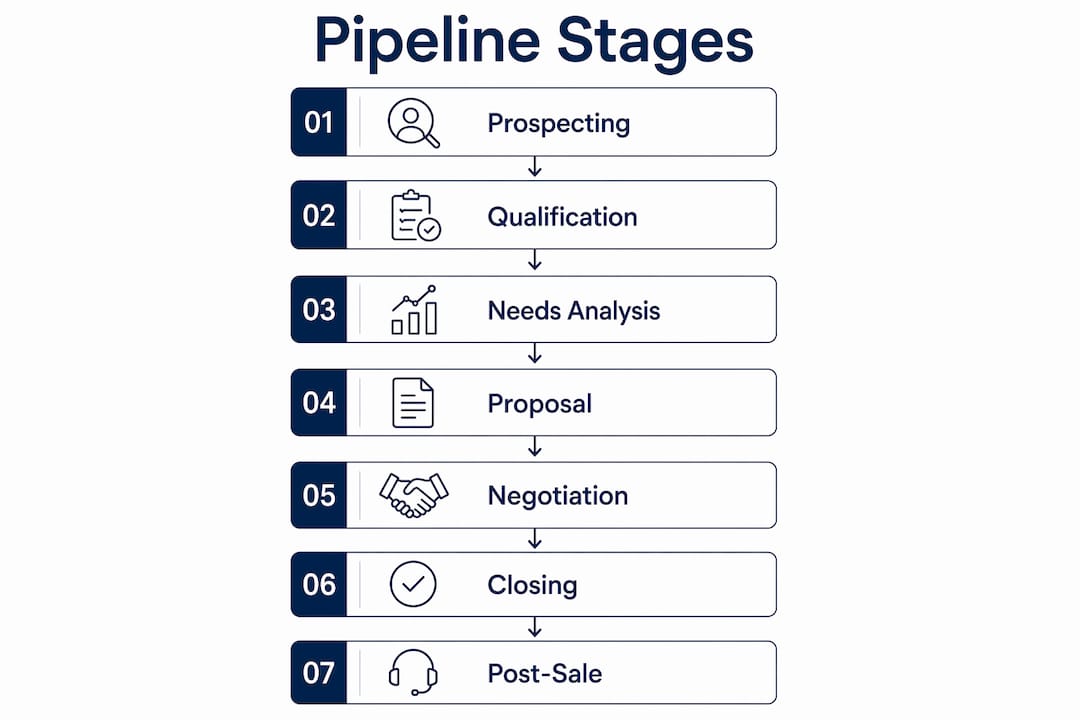
Design 5 to 7 pipeline stages that map directly to buyer milestones. Each stage should represent a meaningful shift in the buyer’s commitment or understanding, not a rep’s administrative action. Here is what that looks like in practice:
- Stage 1: Prospect identified. Entry criterion: contact exists in CRM with a verified business need. Exit criterion: discovery call booked.
- Stage 2: Discovery complete. Entry criterion: discovery call held. Exit criterion: pain points confirmed and decision-maker identified.
- Stage 3: Solution presented. Entry criterion: tailored proposal or demo delivered. Exit criterion: buyer has confirmed they are evaluating your solution.
- Stage 4: Proposal under review. Entry criterion: written proposal submitted. Exit criterion: buyer has shared internal feedback or raised objections.
- Stage 5: Negotiation. Entry criterion: commercial terms being discussed. Exit criterion: verbal agreement on key terms.
- Stage 6: Closed. Entry criterion: contract signed or purchase order received.
The critical detail here is that CRM-enforced exit criteria prevent reps from advancing deals manually without meeting the criteria. Custom fields such as “meeting held” or “decision-maker engaged” create a paper trail that makes your forecast maths reliable. Without this, you are relying on rep optimism rather than buyer evidence.
Pro Tip: Pilot your stage design with two or three reps before rolling it out to the whole team. You will quickly discover which criteria are too vague or too difficult to verify, and you can refine them before they become embedded habits.
For short sales cycles, 4 to 6 stages are usually sufficient. Adding more stages in a fast-moving deal environment causes reps to focus on updating CRM fields rather than actually selling. Keep it lean, keep it buyer-focused, and keep the criteria verifiable.
What metrics reveal about your pipeline health
Tracking the right metrics is what separates teams that forecast accurately from teams that are perpetually surprised by their quarter-end numbers. The three metrics I recommend every sales leader monitors weekly are stage-to-stage conversion rates, pipeline coverage ratio, and pipeline velocity.

Stage-to-stage conversion rates reveal exactly where deals are stalling. If you are converting 70% of Discovery calls to Qualified but only 30% of Qualified to Proposal, the bottleneck is in your qualification process, not your closing ability. That is a targeted, fixable problem. Overall win rates obscure this entirely.
Pipeline coverage ratio is calculated by dividing your total pipeline value by your quota. If your win rate is 25%, you need roughly four times your quota in active pipeline to hit your number. The key detail most teams miss is that coverage should only include deals expected to close within the current quota window. Including deals that will not close this quarter inflates your coverage figure and creates false confidence heading into the final weeks.
Pipeline velocity combines four variables into a single efficiency figure:
- Number of deals in the pipeline
- Average deal value
- Win rate (as a decimal)
- Average sales cycle length in days
Multiply the first three together, then divide by the fourth. A drop in pipeline velocity is an early warning signal for a revenue shortfall, often weeks before it shows up in your closed-won numbers. Review it weekly, not monthly.
Segment these metrics by deal type, territory, or individual rep to get genuinely useful data. A blended average across your whole team hides the fact that one rep has a 60% conversion rate and another has 15%.
How to run pipeline reviews that actually improve results
Weekly pipeline reviews are non-negotiable if you want accurate forecasting and a clean pipeline. The purpose of a review is not to hear reps recite deal updates. It is to validate data, identify blockers, and remove or re-qualify stale opportunities before they rot.
Run weekly reviews where managers update stages, challenge assumptions, and close out deals that have no verified next step. A deal with no agreed next step is not a deal. It is a wish. Treating it as pipeline inflates your numbers and wastes everyone’s time during the review.
Pipeline hygiene practices that make a measurable difference include:
- Closing out any deal that has had no buyer-initiated contact in 30 or more days
- Requiring a verified next step (date, time, and agenda) before a deal can remain in an active stage
- Flagging deals that have been in the same stage for longer than your average sales cycle
- Removing stale deals from active pipeline and moving them to a nurture sequence rather than leaving them to inflate your coverage ratio
The downstream effect of good hygiene is significant. When your pipeline only contains deals with genuine momentum, your forecast becomes trustworthy. Your team stops wasting energy on dead opportunities. And your conversion rate metrics become accurate enough to act on.
Pro Tip: Set a CRM automation rule that flags any deal with no activity in 21 days and sends the rep a task to either update the record or close the opportunity. This removes the burden of manual hygiene from managers and builds the habit into the workflow.
How CRM automation supports pipeline discipline
Automation in your CRM does not replace good sales judgement. It enforces the pipeline discipline your team has agreed on, consistently and without relying on anyone to remember. That is its real value.
Automation features worth implementing immediately include auto-advance rules for early prospecting stages, alerts when a deal has exceeded its expected stage duration, and follow-up sequences triggered when a deal moves to a specific stage. These reduce manual work and prevent the pipeline errors that come from reps updating records inconsistently.
Here is a comparison of manual pipeline management versus CRM-automated pipeline management:
| Area | Manual management | CRM-automated management |
|---|---|---|
| Stage advancement | Rep discretion, often based on activity | Blocked until CRM criteria fields are completed |
| Stale deal detection | Manager spots it in review (if at all) | Automated alert after defined inactivity period |
| Follow-up sequences | Rep remembers (or forgets) | Triggered automatically on stage change |
| Forecast data quality | Dependent on rep discipline | Enforced by field validation rules |
| Reporting accuracy | Varies by team | Consistent and auditable |
Predictive analytics tools within platforms like Salesforce and HubSpot can score deals based on historical win patterns, flagging which opportunities are most likely to close and which are at risk. This is particularly useful for sales managers reviewing a large pipeline, as it directs attention to the deals that need intervention rather than the ones that are progressing well on their own. If you want to shorten your sales cycles as well as improve conversion rates, automation is one of the fastest levers available.
Common mistakes that undermine pipeline optimisation
The most damaging pipeline mistakes are not technical. They are behavioural, and they tend to be invisible until the quarter-end miss makes them obvious.
- Using activity-based stage criteria. “Sent proposal” is not an exit criterion. It is a task. Exit criteria must reflect a buyer decision or action, not a rep’s output.
- Allowing unqualified deals to sit in active stages. Unqualified deals inflate pipeline value and distort every metric you track. Qualify early and close out fast if the fit is not there.
- Running pipeline reviews quarterly instead of weekly. Quarterly reviews catch problems after they have already damaged your forecast. Weekly reviews catch them while there is still time to act.
- Building too many stages for your sales cycle length. A 30-day sales cycle does not need 10 stages. Over-engineering the pipeline creates administrative burden without improving deal progression.
- Backfilling CRM data after the fact. When reps update records retrospectively, the timestamps and progression data become unreliable. Your conversion rate analysis is only as good as the data integrity behind it.
“The pipeline is only as honest as the people updating it. Build a system where honesty is the path of least resistance, not an act of discipline.”
If you notice your forecast is consistently optimistic relative to actual closed revenue, the cause is almost always one of the above. Start with an audit of your stage criteria and your CRM data quality before assuming the problem is with your reps’ closing ability.
Key takeaways
A well-optimised sales pipeline requires buyer-focused stage design, weekly metric reviews, and CRM-enforced criteria to produce forecasts you can actually rely on.
| Point | Details |
|---|---|
| Design buyer-focused stages | Build 5 to 7 stages around buyer milestones, not rep activities, with verifiable exit criteria. |
| Track the right metrics | Monitor stage-to-stage conversion rates, pipeline coverage ratio, and pipeline velocity every week. |
| Run weekly pipeline reviews | Validate data, remove stale deals, and confirm next steps to maintain forecast accuracy. |
| Automate for consistency | Use CRM automation to enforce stage criteria, flag inactivity, and trigger follow-up sequences. |
| Avoid common pitfalls | Activity-based criteria, unqualified deals, and backfilled data are the leading causes of forecast failure. |
What I have learned from years of pipeline work
I have reviewed hundreds of sales pipelines across businesses of all sizes, and the pattern is almost always the same. The pipeline looks healthy on paper, the coverage ratio looks fine, and then the quarter closes 30% below forecast. When you dig into it, the stages are vague, the CRM data is three weeks out of date, and half the deals in the pipeline have had no buyer contact in over a month.
The uncomfortable truth is that most pipeline problems are not pipeline problems at all. They are data discipline problems. Teams that build pipelines that close deals consistently are not necessarily better at selling. They are better at recording reality accurately and acting on what the data tells them.
I also want to push back on the idea that more stages equals more control. I have seen businesses with 12-stage pipelines that were less accurate in their forecasting than businesses with 5 stages, because the complexity gave reps more places to hide deals that were not progressing. Simplicity, enforced by clear criteria, beats complexity every time.
The teams that sustain pipeline health long-term are the ones that make weekly reviews a genuine habit rather than a box-ticking exercise. When managers ask hard questions in those reviews, and when reps know their data will be scrutinised, the quality of the pipeline data improves naturally. That is the culture shift that makes everything else in this guide actually work.
— Jerry
How Aheadofsales can help you optimise your pipeline
If you have read this far and recognised your own pipeline in some of the problems described above, you are not alone. Most of the businesses Aheadofsales works with come to us with exactly these challenges: vague stage criteria, unreliable forecasts, and teams that are working hard but not converting consistently.

Aheadofsales combines bespoke 1:1 coaching with hands-on consultancy to help your team build and manage a pipeline that actually reflects reality and closes deals. Our sales training services cover everything from pipeline stage design and CRM discipline to deal qualification and forecast management. We work with businesses of 50 to 1,000 staff who are serious about hitting target every quarter, and our packages start from £4,500. If you want to find out whether we are the right fit for your team, get in touch with Aheadofsales directly.
FAQ
What is sales pipeline optimisation?
Sales pipeline optimisation is the process of refining your pipeline stages, criteria, and management practices to improve conversion rates, forecast accuracy, and revenue. It involves designing buyer-focused stages, tracking key metrics, and maintaining clean, up-to-date CRM data.
How many stages should a sales pipeline have?
Most sales pipelines work best with 5 to 7 stages aligned to buyer milestones. Short sales cycles typically need 4 to 6 stages; adding more stages than your cycle requires causes reps to focus on CRM administration rather than selling.
What is pipeline coverage ratio and why does it matter?
Pipeline coverage ratio is your total pipeline value divided by your quota. A 25% win rate requires roughly 4x coverage, but only count deals expected to close within the current quota window to avoid inflated and misleading figures.
How often should you review your sales pipeline?
Weekly pipeline reviews are the standard for teams that forecast accurately. Quarterly reviews allow stale deals and bad data to accumulate for too long, which distorts forecasting and wastes time on opportunities that have already gone cold.
What causes inaccurate sales forecasts?
Inaccurate forecasts are most commonly caused by vague stage criteria, unqualified deals sitting in active stages, and CRM data that has been backfilled or not updated in real time. Fixing data discipline is the fastest route to forecast reliability.